Navigation
📚 Documentation Home → Guides → ThingSpeak for Windows XPF
ThingSpeak Add-on for Windows XPF
Retired add-on — archived documentation
The Modbus Monitor ThingSpeak add-on is retired and is not offered for new purchases. This page preserves historical instructions for existing installations, not a supported setup path for new projects. Continued compatibility is not guaranteed. This retirement applies to the Modbus Monitor add-on, not to the MathWorks ThingSpeak service.
For current integration documentation, see MQTT (XPF), MQTT (Android Advanced), or Google Sheets (Android Advanced).
Archived setup reference for the retired Modbus Monitor ThingSpeak add-on.
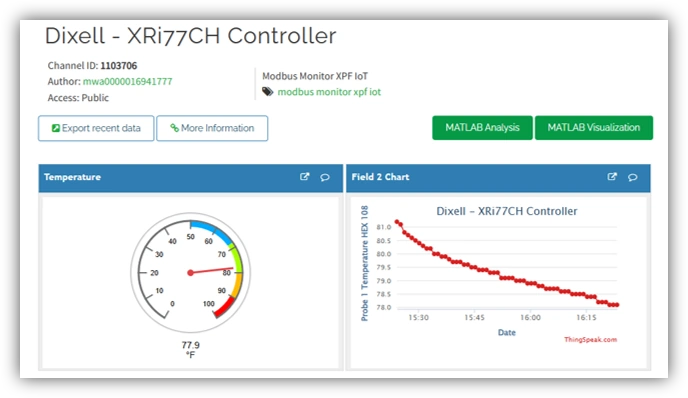
Archived overview — background for existing installations.
Quick Start (3 Steps)
Prerequisites
- ✅ Modbus Monitor XPF installed
- Existing ThingSpeak Add-on purchase (retired; no new purchases)
- ✅ ThingSpeak channel created with Write API Key (see Overview Guide)
Step 1: Configure ThingSpeak Add-On
- Open IoT Tab → ThingSpeak Group
- Enter API Key: Paste from ThingSpeak Write API Key from your channel and account
- Update Interval:
30000Send updates every 30s - Toggle Enable to automatically log data to cloud.
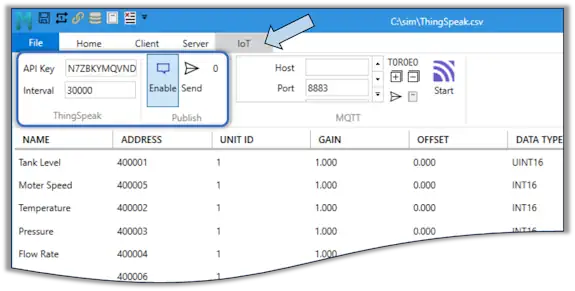
Step 2: Start Polling
- Connect to your Modbus device
- Click Start in the Client Tab
- Your monitor points automatically upload to ThingSpeak
Step 3: View Your Data
- Open ThingSpeak
- Go to your channel → Private View
- See live charts updating with your Modbus data
Done! Your data is now logging to the cloud.
How It Works
Automatic Field Mapping
Monitor points from your project automatically map to ThingSpeak Fields 1–8 in the order they appear:
Your Monitor Points:    ThingSpeak Channel:
1. Tank Level      →    Field 1
2. Motor Speed     →    Field 2
3. Temperature     →    Field 3
4. Pressure        →    Field 4
5. Flow Rate       →    Field 5
6. Humidity        →    Field 6
7. Voltage         →    Field 7
8. Current         →    Field 8
⚠️ Limit: ThingSpeak supports 8 fields maximum. Only your first 8 monitor points upload.
To change what uploads: Reorder your monitor points in Project → Modbus Points using the drag handle. Changes take effect on the next upload cycle.
Update Interval
Data uploads to ThingSpeak based on your polling interval: Interval → Update Interval (ms)
ThingSpeak Requirements:
- Minimum: 15000 seconds for free tier
- Recommended: 30–60 seconds for balanced performance
- The scan timing can be adujsted from the Timeout group in the Client Tab. For detailed configuration related to Timing, see XPF Guide → Time Group.
Windows XPF Features
Add-On Settings
Required Settings:
| Setting | Value | Source |
|---|---|---|
| Write API Key | ABCDEFG1234567890 |
ThingSpeak → API Keys tab |
| Update Interval (ms) | 30000 |
Min 15000ms (free), 1000ms (paid) |
Working with Projects
Create Project for ThingSpeak:
- File → New Project
- Add monitor points for data you want to log
- Tools → Add-Ons → ThingSpeak → Configure
- Save Project with descriptive name
Load Project Later:
- File → Recent or Open
- XPF remembers your ThingSpeak settings
- Click Start Polling to resume logging
Verification & Testing
Check if it's working
- Enable ThingSpeak in Add-On settings
- Start Polling on main screen
- Open ThingSpeak → Your Channel → Private View
- Look for new data points with recent timestamps
Enable Debug Logging: - Tools → Add-Ons → ThingSpeak → Advanced → Enable Verbose Logging - View → Event Log for detailed diagnostics
Troubleshooting
| Issue | Solution |
|---|---|
| "Invalid API Key" error | Verify key matches ThingSpeak Write API Key exactly |
| "Channel not found" error | Confirm Channel ID is numeric and matches ThingSpeak |
| Uploads rate-limited | Increase interval to ≥15 seconds |
| No data uploaded | Check internet connection and Event Log for errors |
| Only first 8 points | ThingSpeak max 8 fields per channel |
Common Tasks
How do I view uploaded data?
ThingSpeak → Your Channel → Private View (or Public View)
Can multiple PCs upload to same channel?
Yes, but coordinate Channel ID and API Key. Data from all sources merges chronologically.
How do I back up my data?
ThingSpeak → Data Import/Export → Download as CSV/JSON
Can I analyze data with MATLAB?
Yes: ThingSpeak has built-in MATLAB integration. See the Overview Guide or ThingSpeak documentation for MATLAB integration details.
Do I need paid ThingSpeak?
Free tier works for most uses. Limits:
- 8 fields per channel
- 15-second minimum update interval
- 3 months data history
Common Tasks
How do I view uploaded data?
ThingSpeak → Your Channel → Private View (or Public View if shared)
Can multiple PCs upload to same channel?
Yes, but coordinate Channel ID and API Key. Data from all sources merges chronologically.
How do I back up my data?
ThingSpeak → Data Import/Export → Download as CSV/JSON
Can I analyze data with MATLAB?
Yes: ThingSpeak has built-in MATLAB integration. See Overview Guide
Do I need paid ThingSpeak?
Free tier works for most uses. Limits: 8 fields per channel, 15-second minimum interval, 3 months data history
How do I export from XPF?
Tools → Export Data → Select date range → Save as CSV
Resources
- ThingSpeak Docs: thingspeak.com/docs
- XPF Help: Tools → Help (built-in documentation)
- MATLAB Integration: mathworks.com/thingspeak
- Community: community.thingspeak.com
- Support: support@quantumbitsolutions.com